Why it makes sense to try commercial FMEA software when PFMEA is most of your workload
Excel is the best software to perform FMEAs! Until it isn’t. In certain companies, there comes a point when managing multiple teams performing FMEAs becomes a full time job. That is true for both design FMEAs and process FMEAs. Today I focus on process i.e. analysis of potential failures in a manufacturing process. The job is typically done by a quality or process engineer. What’s the difficulty here? When you have multiple manufacturing processes that build products for various customers and many of them want to see the process FMEA done according to their internal standards – that is what I talk about. Now imagine also process changes that affect multiple product versions. And new product versions that are being introduced. All that contribute to process FMEA workload. And at some point Excel is no longer the best tool for the job. This is when people start to check what’s in the commercial software.
I write this article because after 15 years in the FMEA software market I can tell that all those process and quality engineers look mostly for the same things. And my message is: it’s worth to take a look and see what’s missing in Excel. Obviously I want to point the reader to the free trial version of Relyence FMEA – which is in fact popular in manufacturing organizations. What are the things they look for?
- “They have their own platform”
Ok, it’s not the most important thing – but a useful in building a lasting FMEA process in any organization. When you have a database driven software where all PFMEAs are kept (and not only PFMEAs but also Control Plans and PFD Worksheets) – this becomes a knowledge portal for quality or process community that can become a sign of excellence for the rest of the company. - “I need to follow standard XYZ”
Nowadays all major FMEA software platforms have unified AIAG & VDA standard implemented. Defence companies often ask for Mil-Std-1629. Setting the right FMEA table inside given software is not an issue typically. Even if your favorite standard is not implemented, often you can just rename fields and customize your own table. In the end you will have what you need and it can be improved to your liking. But the best thing here is that all users can agree to use it and it provides more rigid (i.e. consistent) FMEA environment than xls – where anybody can add anything at any time. - Process FMEA vs Process Flow Diagram (PFD) vs Control Plan.
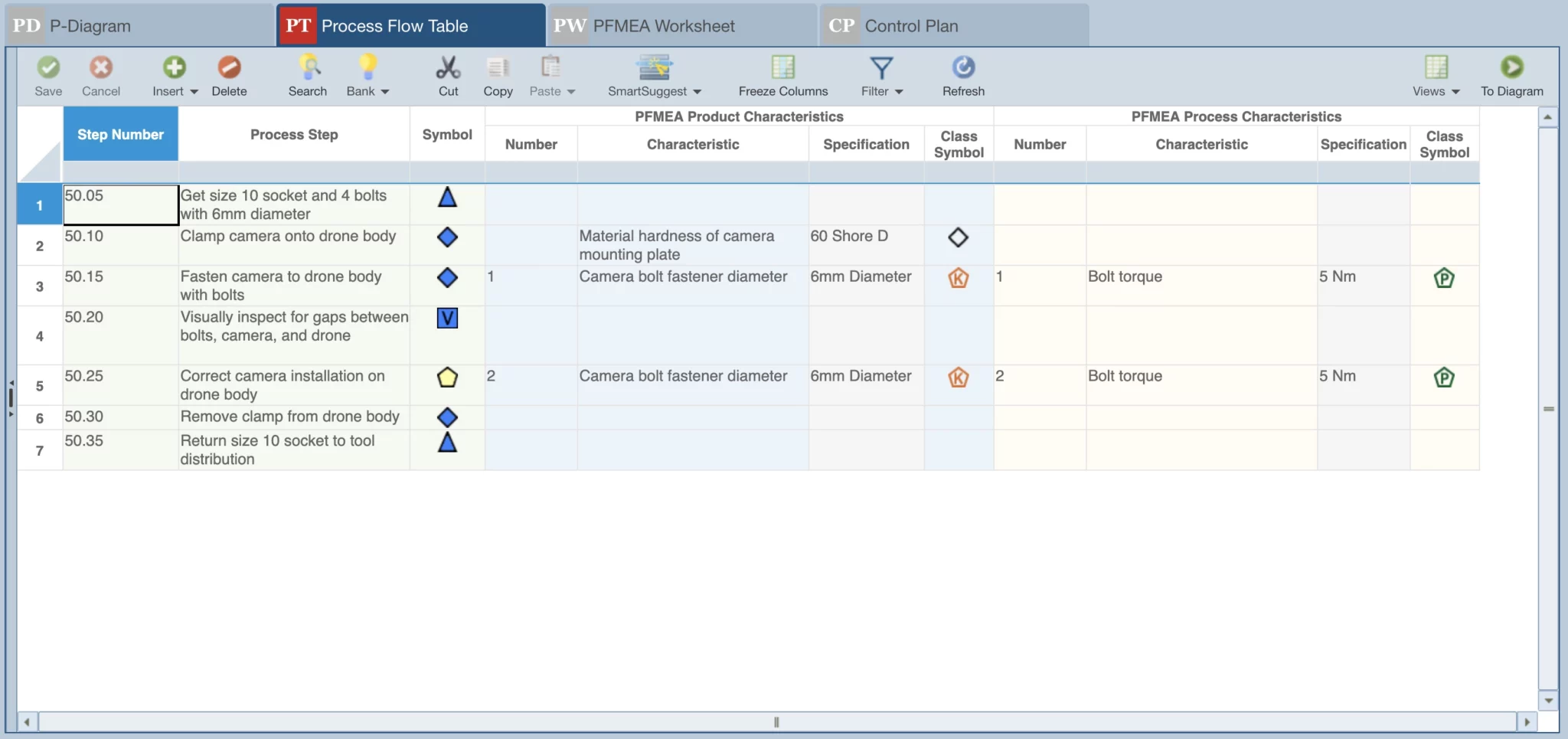
PFMEA is strongly linked to PFD diagram and Control Plan. In large manufacturing organizations it just takes too much time to keep them synchronized manually in Excel. All people considering commercial software ask for the connection between them. And it is not always about automatic updates when one of those document changes – it’s more about not loosing track of those changes and how to push them to other documents. - User experience.
It’s not that difficult to create better FMEA interface than pure Excel. But what matters is speed – if commercial software truly saves time of PFMEA users. It could be that visually its better than xls tables – but one still needs a lot of clicking to manipulate PFMEAs, PFDs and Control Plans. And that is a sign of poorly optimized interface. That is also the thing all potential buyers ask – to have a user friendly interface. Imagine the change in work life – when you switch from going all day through xls files to an interface that actually saves you a lot of that redundant clicking – and all that in much cleaner interface. - Naming conventions.
There are some elements of PFMEA and related documents that should use consistent naming. For example failure modes – it’s best to call the same issues using the same description. This allows to see how often they appear in the analysis (i.e. the frequency or how big of an issue it is) – and in the end also helps to select the same treatment each time.
Another example are the PFMEA Controls – work instructions or quality tests – that should use consistent naming.
There are ways to do it in Excel – but it’s just much better with dedicated tools in the commercial software. - Reusing past knowledge.
The worst thing that can happen in manufacturing is when you have a problem in a product that you solved in the past. When discussing commercial FMEA software sales – everybody ask for a functionality to reuse information from past PFMEAs. And obviously copy/paste will do the job but there are tools in commercial software that can do it even better – because it can suggest what information from the past may be applicable e.g. failure modes from similar process step – or what process controls were used for similar failure modes etc. - Data safety.
PFMEA information is quite sensitive and should not circulate freely in a company network. Dedicated software is an additional layer of protection that help to protect it, distribute to relevant users and keep track of its usage. Much more so than PFMEAs in multiple independent xls files.
My observations are general. It’s something I learned working with two different software companies. And it didn’t even change much across 15 years I’m in FMEA software business.
The reason for trying Relyence FMEA in particular is that it is received well in manufacturing/quality. That is my observation from the sales and from many demo sessions I did with potential customers from quality or process design teams. If you decide to try it, you will discover yourself that it scores high in all the areas I explain above.
